- Stages
- Displaying Geometry
- Layers
- Construction Planes
- Place in Alias environment where multiply wires exist
- When to use Stages
- Multi-user Environment
- Standard Set on Environments or Data
- Similar to multi-open files in Photoshop, Illustrator, etc.
- File -> Open, click No on opening the second file.
- Save Stage Sets
- Save individual files
- Switch between stages
- Merge Stages
Note: You can switch between
stages using the Stage button located below the Menu bar on the left side.
- Duplicate Names
- Rendering errors when files are merged
- Template
- Pick Template
- Invisible/Visible
- All
- Pick Object
- Bounding Box
- Only visual, still active in scene
- Quicker screen updates
- Information Window
- Layers -> New
- Naming
- By Name
- By Number
- Assign
- Set state
- Pickable
- Reference
- Inactive
- Visible
- Playback
- Symmetry
- Pick Objects
- Color
- Construction Layers
- Making active
- Arranging
- Setting Multiply Layers at one time
- Located under "Grid" tab in Tool Palette
- Free Plane
- Surface Plane
- Manipulators
- Location
- Scale
- Angle
- Toggle Planes
- Set Construction Plane
- Pick -> Object
- Grids -> Free Plane
- Defining Orientation & Units
- Xform Tools
- Creating Objects
- Grouping & Deleting Objects
- Z up vs Y up
- Need to exit Alias for change to take place
- To set Units from cm to inches
- Preferences -> Construction Settings -> Units -> Linear
- This change will take affect immediately
- Translate
- Scale
- Proportional
- Non-Proportional
- Rotate
- Constraint Direction
- Left, Middle & Right Mouse Buttons
- Pivot Points
- Primitives - Pre defined shapes made up of surfaces
- Mouse & Manipulators
- Translate
- Scale
- Rotate
- Command Line
- Absolute vs Relative Values
- Information Window
- Grid Snap
- Toggle
- Temporary
- Copy/Paste
- Duplicate
- Multiply Copies
- Translate, Rotate & Scale
- Mirroring
- Though Pivot Point
- Grouping
- New Positional Node
- Pivot Point at 0,0,0
- Delete Active
-All
-Individual Surfaces
:
- Anatomy of a Curve
- Editing a Curve with CVs & Edit Points
- Revolve Tool
- Construction History
- Display Options
- Editing a Surface with CVs & Hull Lines
- Control Vertex (CV)
- Normally lie off the curve
- Influence the shape of the curve
- Can be manipulated to modify shape of the curve
- Hull
- Connects two CV's together
- Used for Display and Selection Purposes
- Direction
- "U" Direction
- Start of Curve
- Edit Point
- Lie directly on the curve
- Represent the beginning and end of individual polynomial sections
- Can be manipulated to modify shape of the curve
- Span
- Polynomial section
- Identified as section of a curve between two edit (knot) points
- Degree of a Curve
Curve Degree 1- Straight line
- Curve Degree 2 - circles, parabolas, ellipses and conic sections
- Curve Degree 3 - Can twist freely in 3D Space
- Curve Degree 5 & 7
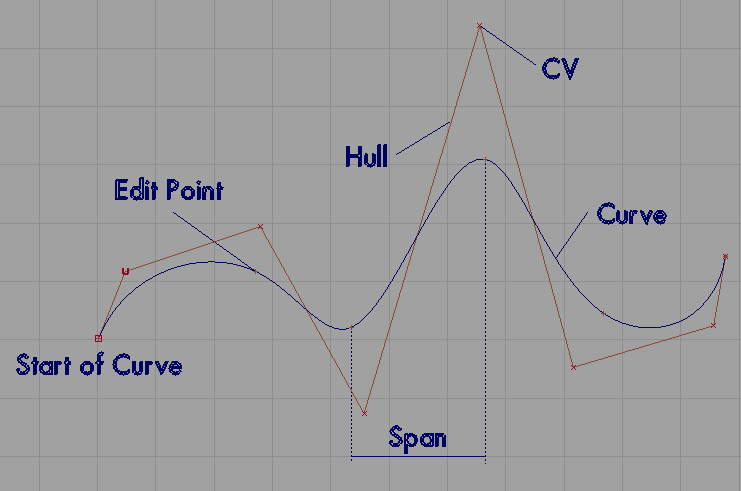
Parts of a Curve
- Pick -> Point Types -> CV or Pick -> Point Types -> Edit Points
- Xform
- Move
- Rotate
- Scale
- Pivot Points - Same point as overall curve - Can be moved or modified
- CV's - Finer Control
- Edit Points - Major Curve Changes
- Switching between CVs or Edit Points
- Option Box
- Revolution Axis - X, Y, Z
- Axes - Global vs Local
- Surface Degree
- Sweep Angle
- Sections
- Create History
- Interactive Mode
- Revolve Axis
- Revolve Degree
- History - Pick -> Object, Surface -> Revolve
- Isoparms
- Number and Location
- Edit Points on Generation Curve
- Number of Sections defined in Option Box
- Maintained between construction curve and resulting curve
- Restricts CVs movement
- Breaking Construction History
- Delete Construction History
- Delete Construction Curve
- Move the Surface
- To avoid breaking Construction History
- Move construction curve
- Object Display -> Control -> Option Window
- Toggle CVs, Hulls, Edit Points, etc. Off/On
- Scope
- Active
- All
- New Curve/Surface
- Curves have CV's and Edit Points
- Surfaces have CV's and Isoparms
- Use Pick Nothing!!
- Pick -> Point Types -> CV
- Pick -> Point Types -> Hull
- Use bounding Boxes
- Will pick all CVs in region
- Use other windows to verify
- Working with Curves
- Curve Editor
- Keypoint Curves
- Curve Modification
- Edit Point Curves
- Knot Spacing - Chord vs Uniform Spacing
- Inserting Edit Points
- Start with minimum, add more geometry as needed
- Attaching Curves
- Blend - Modifies both curve or surface
- Fit - Modifies the 2nd curve or surface
- Attach - Creates additional edit points or spans, will retain the shape
of the curve or surface
- Tangent - Holds the shape and end tangent direction of the curve or surface
- Connect - Creates a single straight span between the two curves or surfaces
- Detach Tool
- Nearest Edit Point
- Like handles in Illustrator
- Gives you control over a greater region - Multiply CVs
- Note: Does not move, scale or rotate chosen
point on curve - moving neighboring CVs!
- Handles
- Parameter
- Position
- Rotate
- Scale
- Option Box
- Finer or Greater Control
- Has "Undo"
- Switch to another curve
- CAD like curves
- Straight, parallel, arcs, circles, etc.
- Keypoints are another form of Construction History
- Length
- Angle
- Radius
- Inserting a Keypoint Curve
- Placing Keypoints
- Guidelines
- Updating Keypoint Curves
- Using Keypoints
- Using Information Window -> Attribute
- Curve Section Tool
- Trim - Retains the segment of the curve selected (clicked on)
- Segment - Detaches curve at the intersection
- Slice - Creates curve or Inserts Edit Point
- Cut Tool
- Only for Keypoint Curves
- Indicate Keypoint to cut at
- Join Tool
- Only for Keypoint Curves
- Keypoints of two curves must be snapped to each other - Magnetic Snap
- Attach/Detach Tools
- Used for curves with and without Keypoints
- Fillet Tool
- AD curve
- Used on any type of curve
- Multi Knots!!
- Bad!!
- Multi edit points that exist on top of each other
- Create a segment of "zero" length
- Many of the higher order tools that utilize continuity will have errors
of dis-continuity (G0 or G1)
- Symmetry
- Skin Surface
- Boundary Surface
- Extrude Surface
- Set Planar Surface
- What happens with a curve or surface when Symmetry is
applied
- CVs are adjusted
- Using Layers
- Layers->Symmetry -> Set Plane
- Show or Hide Mirrored Geometry - Symmetry -> On, Symmetry -> Off
- To Align Mirrored geometry - Object Edit -> Symmetry Plane Align
(Curve or Surfaces have Tangent Continuity)
- Convert to Geometry - Layers->Symmetry -> Create Geometry
- Mirrored Geometry behaves like instances: Cannot show or edit control points,
cannot assign independent shaders
- Similar to stretching a canvas over the poles of a tent
- Two Modes
- Continous Surface - Shift/Click
- New or Separate Skin Surface - Select end curve just by clicking on it
- Deselect cross section - Shift/Click previous curve
- Can use Isoparms of surfaces
- Three or four sided surfaces can be made
- Use snapping tools (Magnetic, Grid or Curve snapping) to make sure the curves
intersect at their endpoints, creates a more predictable surface
(An aside: Use Magnetic Snap (either hold down control
key to turn it on temporally or click on Mag button at end of information
window to toggle it on and click near an CV or Edit Point )
- If the surface is twisted, make sure opposing boundary
curves have same direction
- Three sided surfaces is a four sided surface with
one side of zero length. This is sometimes called a degenerate surface.
- Boundary curves can be picked in any order.
- This tool does not maintain continuity. Use Square
Tool.
- Used to extrude a generation curve along a path curve
- Generation Curve can be a free curve, curve on surface, isoparm, trim edge
or face.
- Path Curve can be a free curve, curve on surface, isoparm, or trim edge.
- Generation Curve does not have to be near or intersect the path curve.
- Options
- Style - Tube - Rotates along path, Flat - Does not rotate but maintains
original orientation
- Creates Faces - Create end of the extruded surface
- Extrude Pivot- Used when there are more than one profile curve, Closet -
Average of all objects, Component - Individual pivot points of each object.
- Create a planar face or trimmed NURBS surface from a set of planar boundary
curves.
- Face - do not have a V parameter or isoparm
- Trim Surface - creates a simple NURBS plane with trimmed section, more versatile
than faces
- Curves used to create surfaces must be planar - Use Curves -> Curve Planarize
or grid snap CV's with mouse constraint.
- Surface Coordinate System
- Terms of Surfaces
- Proportional Modify
- Curve on Surfaces
- Trimming Surfaces
- A "local" or parameter space coordinate system for each surface
- Has both a U&V direction, curves only have a U direction
- U direction is usually determine by generation curve
- Used to locate curve on surfaces, modify the surface and/or orient texture
maps
- Orientation of U&V define the surface normal by the "right-hand
rule"
- Use Object Edit -> Reverse direction to change orientation of U&V
(direction of U or V and the origin of the surface) thus modifying surface
normal
- Edges
- U&V Direction
- Isoparm (Flow lines),correspond to edit point on curves when the surface
is created
- Span and Patch area
- CVs
- Allows you modify one CV while neighboring CVs on the surface are changed
proportionally
- Modes of Operation (Tramsformation Modes) include Move, Scale and Rotate
- Degree refers to the amount of change that neighboring CVs are influenced
- A degree of 0 applies the transformation equally over the affected region
- If the value is positive, the effect of the transformation is drecreased
for CVs that are further away from the primary CV, the greater the degree
the greater the dampering
- If the value is negative, the effect of the transformation is increased
for CVs that are further away from the primary CV
- Preceding and Succeeding CVs are influence - how many CVs before and after
the primary CV modified
- Can be used on curves or surfaces
- Shapes like springs or twisted curves can be defined
- Curves that are associated or draw on a given surface
- Used to define closed regions for surface modification (Trim or Trim Divide
Tools)
- Curves are created with edit points, CVs are the CVs of the surface
- Edit points are located by the U&V of the surface
- SBD window shows curve dag node attached to a surface dag node
- Can be created by:
- Curves -> Curves -> New curve on surface
- Surface Edit -> Create Curves on Surfaces -> Project
- Surface Edit -> Create Curves on Surfaces -> Intersect
- Surface Edit -> Create Curves on Surfaces -> Geometry Mapping
- Used to modify a surface
- The region to be trimmed must have a closed region defined by curve on surfaces
and/or surface edges
- There are two basic tools for trimming a surface:
- Surface Edit -> Trim -> Trim
- Surface Edit -> Trim -> Trim divide
- Trim Tool can be used to modify multiply closed regions at one time
- Trim Divide Tool will make a duplicate surface and trim it the opposite
way
- Trimming does not remove geometry from a surface. It makes invisible until
it is untrim.
- Use the Surface Edit -> Trim -> Untrim to untrim the surface and
bring back curve on surfaces
- Shrink Surface (an option for both the Trim and Trim divide tool) will do
away with the ability to untrim a surface
 To the Georgia Tech Homepage
Georgia Tech
Disclaimer


